
Build a workspace image#
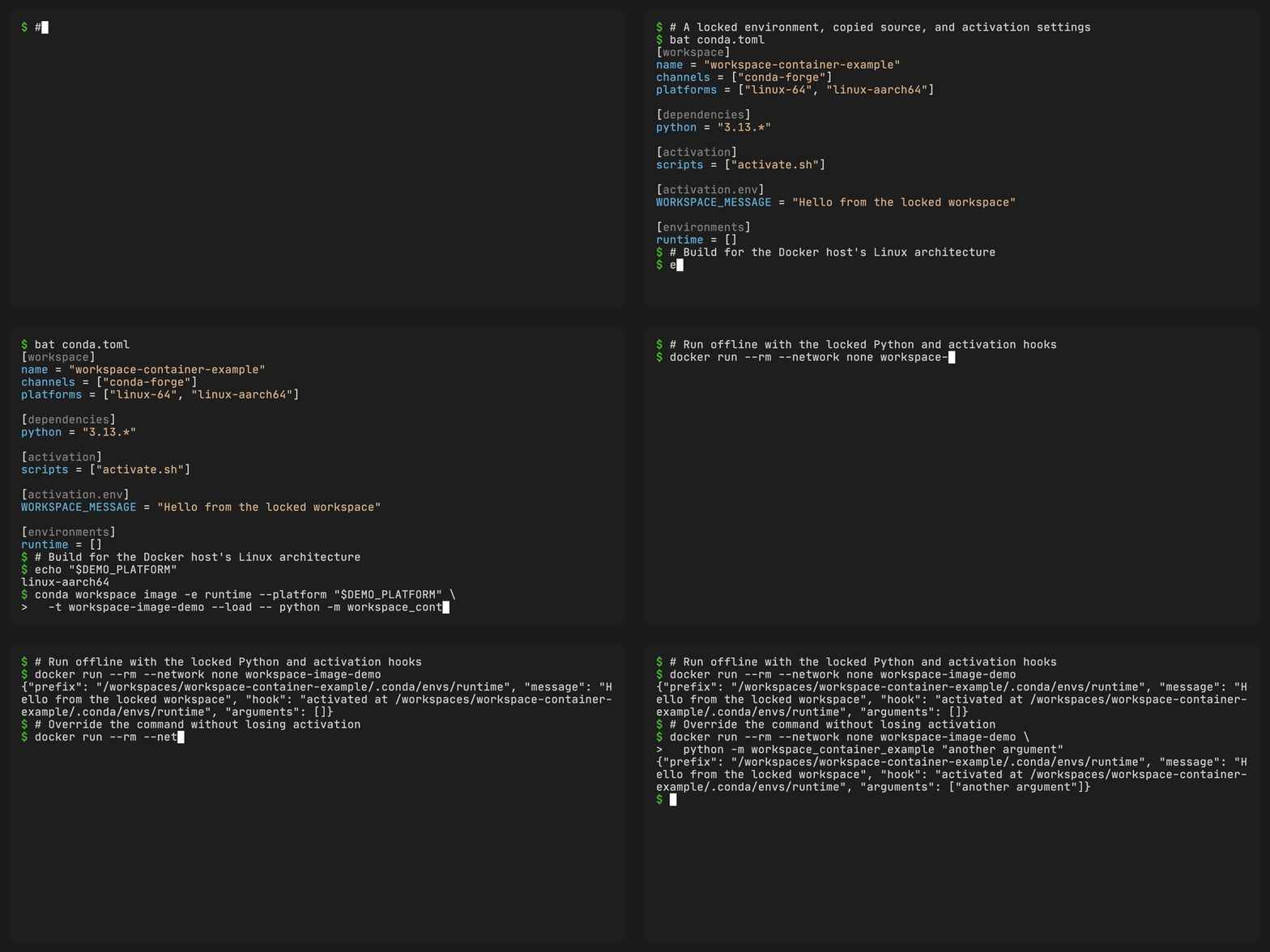
conda workspace image builds one locked Linux environment and the workspace’s
project files into a runnable container image. It delegates image construction
to Docker Buildx and installs packages through conda inside the Linux builder.
Install Docker with Buildx and ensure its daemon is running. Image tooling is
optional for other workspace commands and for image --dry-run.
Prepare the environment#
Set the workspace’s name, declare a runtime environment and Linux platform in
the manifest, then generate conda.lock. The image command requires a current,
complete lockfile and never updates the source manifest or lockfile. The
workspace name must be a nonempty portable directory name without dollar signs
or apostrophes. Image environment paths have the same restriction. Conda expands
environment variables when activating a prefix, and Dockerfile parsing
interprets apostrophes in source paths. Spaces are supported.
Applications can run directly from the copied project files, for example with
python -m myapp or python app.py. Declare their runtime requirements in the
selected environment. Version-based PyPI dependencies use the existing
conda-pypi integration. Python path, Git, and URL dependencies are not supported
by the image command.
Local Python package builds are tracked in #178. They will use the shared workspace installer once conda-pypi provides strict builds with locked requirements and activated backends through conda-pypi#521 and conda-pypi#523.
The container example includes application source files, activation settings, and a lockfile for both supported Linux architectures. Build it with the image command in its README.
Build and run#
conda workspace image -e runtime --platform linux-64 \
  -t myapp:latest --load -- python -m myapp

docker run --rm myapp:latest
Use linux-aarch64 for ARM64. A named workspace platform that maps to either
supported subdir is also accepted. Building for another architecture requires
a builder capable of running that architecture, either natively or with
emulation.
The command after -- becomes the image’s default command. Docker command
arguments override it while preserving activation:
docker run --rm myapp:latest python -c 'import sys; print(sys.prefix)'
The final image contains selected project files at /workspaces/<name>, using
the manifest’s workspace name. This is also its working directory. The selected
environment stays at /workspaces/<name>/.conda/envs/<environment>. Its bin
directory and /workspaces/<name>/.conda/bin are on PATH. The workspace’s
workspace-entrypoint applies conda environment variables and sources activation
hooks before using exec to start the application. Startup performs no
installation or solving. Conda and temporary build tools are excluded unless
the selected environment or base image itself includes them.
Mount runtime data into a subdirectory, for example
--mount type=bind,src=/path/to/data,dst=/workspaces/myapp/data for a workspace
named myapp. Mounting over /workspaces/myapp would hide both its project
files and installed environment.
Choose a compatible glibc-based Linux base with /bin/bash:
conda workspace image -e runtime --platform linux-64 \
  --base-image ubuntu:24.04 -t myapp:latest --load -- python -m myapp
The default is debian:bookworm-slim. The build checks native virtual packages
against locked package and manifest requirements. The runtime host must also
meet kernel, CPU, and driver requirements. Pin base images by digest when a
stable base is required. The bootstrap image is versioned. It installs native
Linux tool dependencies separately from the locked application. The build
uses a copy of the invoking conda-workspaces Python sources and a released
conda-pypi package.
The generated recipe uses the ordinary install command for both phases, equivalent to:
RUN /opt/conda/bin/python -m conda workspace install \
    --locked -e runtime --platform linux-64 --download-only
RUN --network=none /opt/conda/bin/python -m conda workspace install \
    --locked -e runtime --platform linux-64
The first phase validates the lockfile and fetches its packages without
creating an environment. The second installs the locked environment with
networking disabled. The generated commands use the selected manifest, environment, and platform.
conda_workspaces.image_entrypoint then renders the runtime activation wrapper.
The base must not already contain the selected workspace path, such as
/workspaces/myapp. Other directories under /workspaces are allowed. This
prevents files from an earlier version of the selected workspace or environment
surviving a new build. Extend an existing workspace image with a downstream
Dockerfile.
Each invocation builds one workspace and selects one default runtime command. Named workspace directories can coexist, each keeping its own manifest, environment, and activation wrapper. Their task and dependency graphs remain separate.
Extend the image#
Use the generated image in FROM to add files and build steps:
FROM myapp:latest
WORKDIR /srv/app
COPY app.py .
RUN workspace-entrypoint python -m py_compile app.py
CMD ["python", "app.py"]
Ordinary commands such as RUN python --version find the selected environment
through PATH. Docker build steps do not use the image’s ENTRYPOINT. Invoke
workspace-entrypoint explicitly when a build step needs manifest environment
variables or activation hooks. The derived image retains the activating
entrypoint for its runtime command. Changing WORKDIR changes the command’s
working directory without relocating the installed environment.
For a multistage build using COPY --from, preserve the installed prefix’s
absolute path and use a compatible Linux base. Copying /workspaces/<name> to
the same location includes the environment, project files, and its activation
wrapper at /workspaces/<name>/.conda/bin/workspace-entrypoint. Copying files
does not carry image configuration such as PATH, ENTRYPOINT, CMD, or
WORKDIR. Set those in the final stage as needed.
Export or publish#
Choose exactly one destination. --load loads an image into the local Docker
image store. --push publishes tagged images through the builder’s registry
support and existing authentication:
conda workspace image -e runtime --platform linux-64 \
  -t registry.example.org/myapp:latest --push -- python -m myapp
-o/--output writes a standard OCI image layout tar archive:
conda workspace image -e runtime --platform linux-64 \
  -t myapp:latest -o myapp.oci.tar -- python -m myapp
The archive contains oci-layout, index.json, and content-addressed blobs.
Use an OCI-aware tool to copy or import it, for example:
skopeo copy oci-archive:myapp.oci.tar docker-daemon:myapp:latest
Use --load when loading directly into Docker, whose archive import support
varies by image store. Existing output files are never overwritten. A failed
build does not publish a partial archive.
By default the command creates a temporary docker-container Buildx builder
and removes it afterward. For repeated builds, reuse a builder and its cache:
docker buildx create --name workspace-images --driver docker-container
conda workspace image -e runtime --platform linux-64 \
  --builder workspace-images -t myapp:latest --load -- python -m myapp
An explicitly selected builder remains available after the command. OCI archive
exports require a supporting driver such as docker-container. See Docker’s
OCI exporter documentation.
Inspect the inputs#
conda workspace image -e runtime --platform linux-64 \
  -t myapp:latest --load --dry-run --json -- python -m myapp
The preview includes the recipe, build package names, selected files, environment,
platform, base, tags, and destination. Successful builds return these artifact
identifiers in JSON: environment, workspace, prefix, platform,
oci_platform, tags, output,
load, push, digest, and image_id. Build logs go to stderr.
Project files follow the existing archive selection rules. Git workspaces include tracked files, plus the manifest and lockfile when allowed by the archive filters. Required activation scripts must be included. Ensure the selected files include the application modules used by the runtime command.
Python path, Git, and URL dependencies, editable installs, and local conda channels are rejected. Container configuration schemas, multi-architecture image indexes, and task-oriented entrypoints are not supported.