
CI pipeline#
Use conda-workspaces in GitHub Actions to install environments and run tasks that test your project.
Basic setup#
# .github/workflows/test.yml
name: Tests

on:
  push:
    branches: [main]
  pull_request:

jobs:
  test:
    runs-on: ${{ matrix.os }}
    strategy:
      matrix:
        os: [ubuntu-latest, macos-latest, windows-latest]

    steps:
      - uses: actions/checkout@v4

      - uses: conda-incubator/setup-miniconda@v3
        with:
          miniforge-version: latest
          activate-environment: ""

      - name: Install conda-workspaces
        run: conda install -n base conda-forge::conda-workspaces

      - name: Install test environment
        run: conda workspace install -e test

      - name: Run tests
        run: conda task run -e test check
Tip
When CI=true is set (as it is by default in GitHub Actions, GitLab
CI, and most CI systems), conda workspace install automatically
behaves like --locked. It installs from the lockfile and fails if
it does not satisfy the manifest.
What happens when the lockfile is stale in CI?#
If someone updates conda.toml without running conda workspace lock,
the CI job fails with this error:
LockfileStaleError: Lockfile 'conda.lock' does not satisfy manifest 'conda.toml'.
(Dependency 'requests' is required by environment 'default' but not found
in the lockfile for platform 'linux-64')
Run 'conda workspace lock' to update it, or use --frozen to install anyway.
The developer fixes this locally by running conda workspace lock (or
conda workspace install, which updates the lockfile
automatically) and committing the updated conda.lock.
Caching environments#
Speed up CI by caching the .conda/envs/ directory:
      - uses: actions/cache@v4
        with:
          path: .conda/envs
          key: conda-envs-${{ runner.os }}-${{ hashFiles('conda.lock') }}
          restore-keys: |
            conda-envs-${{ runner.os }}-

      - name: Install test environment
        run: conda workspace install -e test
Multiple environments#
Run different checks in separate jobs:
jobs:
  test:
    runs-on: ubuntu-latest
    steps:
      - uses: actions/checkout@v4
      - uses: conda-incubator/setup-miniconda@v3
        with:
          miniforge-version: latest
      - run: conda install -n base conda-forge::conda-workspaces
      - run: conda workspace install -e test
      - run: conda task run -e test check

  docs:
    runs-on: ubuntu-latest
    steps:
      - uses: actions/checkout@v4
      - uses: conda-incubator/setup-miniconda@v3
        with:
          miniforge-version: latest
      - run: conda install -n base conda-forge::conda-workspaces
      - run: conda workspace install -e docs
      - run: conda task run -e docs build-docs
Matrix-split locking#
Added in version 0.4.0: Requires --output and --merge, both introduced in 0.4.0.
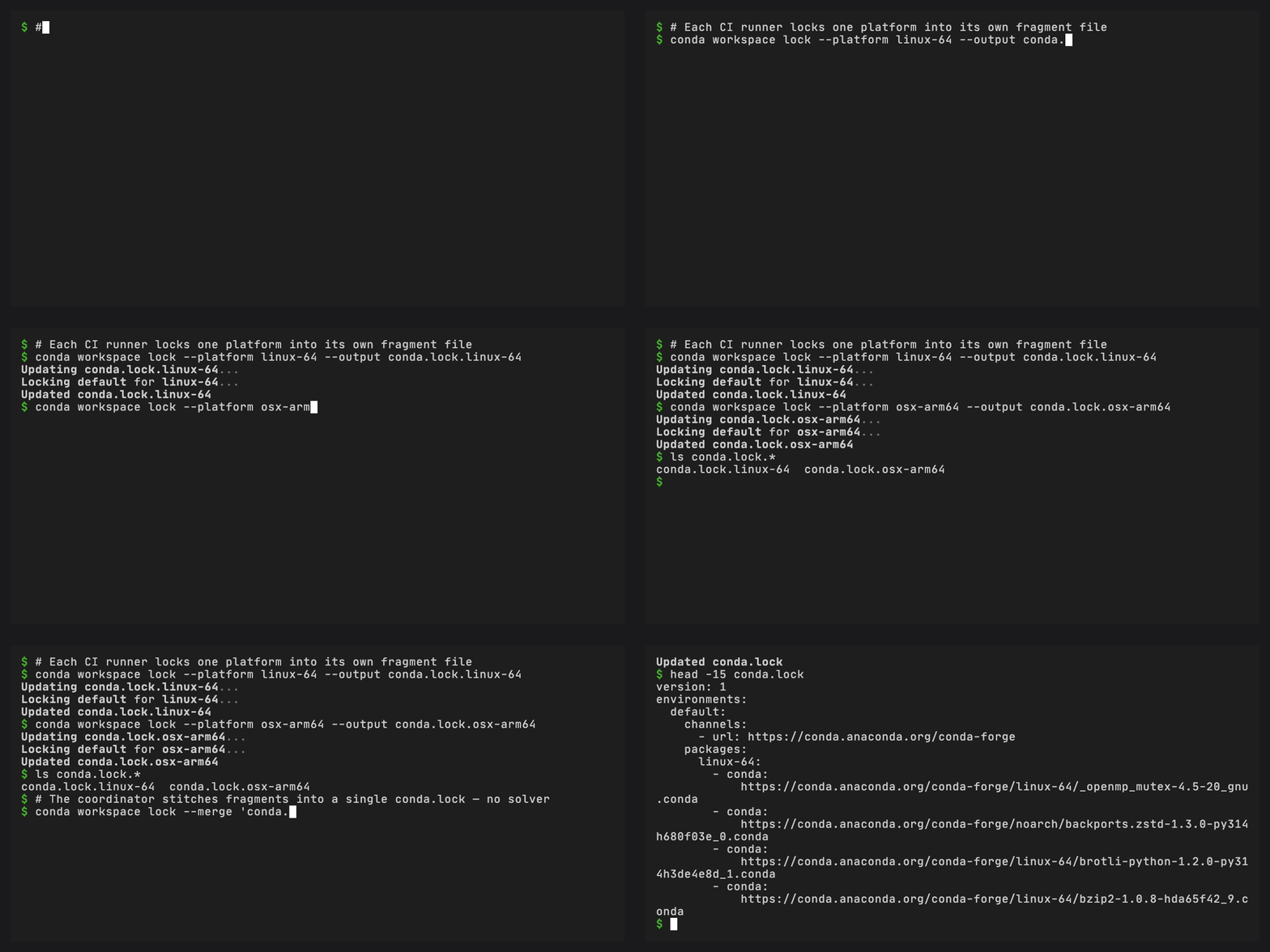
conda workspace lock can split solving across a matrix and combine
the per-platform fragments into a single conda.lock in a coordinator
job. Solving in parallel speeds up lock refreshes as the platform list
grows. Each runner only needs the solver dependencies for its platforms.
--output <path> writes the solved lockfile to an arbitrary
location so each matrix runner emits exactly one fragment.
--merge <glob> (repeatable) combines fragments without running
the solver. The merger checks that schema versions and each
environment’s channel list agree, and rejects overlapping (environment, platform) pairs. The resulting conda.lock is byte-stable with
what a single-run conda workspace lock would produce. --merge
is mutually exclusive with --environment, --platform,
--skip-unsolvable, and --output.
# .github/workflows/lock.yml
name: Refresh conda.lock

on:
  workflow_dispatch:
  schedule:
    - cron: "0 6 * * 1"   # Mondays, 06:00 UTC

jobs:
  solve:
    runs-on: ${{ matrix.os }}
    strategy:
      fail-fast: false
      matrix:
        include:
          - os: ubuntu-latest
            platform: linux-64
          - os: macos-latest
            platform: osx-arm64
          - os: windows-latest
            platform: win-64
    steps:
      - uses: actions/checkout@v4
      - uses: conda-incubator/setup-miniconda@v3
        with:
          miniforge-version: latest
          activate-environment: ""
      - run: conda install -n base conda-forge::conda-workspaces
      - name: Solve ${{ matrix.platform }}
        run: |
          conda workspace lock \
            --platform ${{ matrix.platform }} \
            --output conda.lock.${{ matrix.platform }}
      - uses: actions/upload-artifact@v4
        with:
          name: conda-lock-fragment-${{ matrix.platform }}
          path: conda.lock.${{ matrix.platform }}

  merge:
    needs: solve
    runs-on: ubuntu-latest
    steps:
      - uses: actions/checkout@v4
      - uses: conda-incubator/setup-miniconda@v3
        with:
          miniforge-version: latest
          activate-environment: ""
      - run: conda install -n base conda-forge::conda-workspaces
      - uses: actions/download-artifact@v4
        with:
          pattern: conda-lock-fragment-*
          merge-multiple: true
      - name: Merge fragments into conda.lock
        run: conda workspace lock --merge "conda.lock.*"
      - uses: actions/upload-artifact@v4
        with:
          name: conda-lock
          path: conda.lock
The coordinator does not run a solver, so it can use the lightest
runner available. A fragment with an incompatible schema or channel
list raises LockfileMergeError, and no conda.lock is written.
Scheduled lockfile refresh#
Set up a scheduled workflow that re-solves the lockfile and opens a
pull request when package versions change. conda workspace lock
always solves. The CI-default strict mode applies to workspace install,
so no override is needed here:
# .github/workflows/refresh-lock.yml
name: Refresh conda.lock

on:
  schedule:
    - cron: "0 6 * * 1"   # Mondays, 06:00 UTC
  workflow_dispatch:

jobs:
  refresh:
    runs-on: ubuntu-latest
    steps:
      - uses: actions/checkout@v4
      - uses: conda-incubator/setup-miniconda@v3
        with:
          miniforge-version: latest
          activate-environment: ""
      - run: conda install -n base conda-forge::conda-workspaces

      - name: Re-solve and update lockfile
        run: conda workspace lock

      - name: Open PR if lockfile changed
        uses: peter-evans/create-pull-request@v6
        with:
          commit-message: "Update conda.lock"
          title: "Update conda.lock"
          branch: auto/conda-lock-refresh
          delete-branch: true
The scheduled workflow picks up upstream releases. Other CI runs continue to use locked installs.
Task caching in CI#
If your tasks use inputs/outputs caching, the cache directory can
be preserved between runs for faster incremental builds:
      - uses: actions/cache@v4
        with:
          path: ~/.cache/conda-workspaces
          key: conda-workspaces-tasks-${{ hashFiles('src/**/*.py') }}
FAQ#
Which CI systems set CI=true automatically?#
GitHub Actions, GitLab CI, Travis CI, CircleCI, Azure Pipelines,
Buildkite, Bitbucket Pipelines, and most other hosted CI systems set
CI=true by default. If your CI system does not, set it yourself:
env:
  CI: "true"
How do I override the CI default and allow re-solving?#
Pass --no-lock to bypass the lockfile entirely and force a fresh
solve, even when CI=true:
conda workspace install --no-lock
This is useful for scheduled jobs that pick up new upstream releases (see Scheduled lockfile refresh above).
When should I use --locked vs --frozen?#
Flag |
Use when |
|---|---|
(default in CI) |
Normal CI runs. Equivalent to |
|
You want a clear error if the lockfile is stale. This is the CI default. |
|
You intentionally pinned older versions and do not want staleness checks. Installs whatever is in |
What causes a lockfile merge to fail?#
conda workspace lock --merge rejects fragments when:
Fragments use different schema versions.
The channel list for a shared environment differs between fragments.
Two fragments contain the same
(environment, platform)pair.
The error message names the conflicting fragment. Fix the input fragments and re-run the merge.
How do I handle platforms that fail to solve?#
Use --skip-unsolvable to let the solver continue past platforms
where no solution exists:
conda workspace lock --skip-unsolvable --output conda.lock.solvable
Skipped platforms are reported as warnings. The explicit fragment
covers only the platforms that solved successfully. Merge it with
fragments covering the remaining required pairs before using it as
the canonical lock. CI jobs for skipped platforms will fail at
install time with LockfileNotFoundError.
How do I manage disk space on long-lived CI runners?#
conda-workspaces stores environments under .conda/envs/ relative
to the workspace root. On long-lived runners where old environments
accumulate:
# Remove all workspace environments
conda workspace clean --yes

# Or remove conda's package cache
conda clean --all -y
When using GitHub Actions cache, tying the key to conda.lock
changes the cache key when the lockfile changes. Existing caches remain
until they are deleted or evicted under
GitHub’s retention and storage limits.
Tasks without workspaces#
If you use conda-workspaces for tasks without a workspace definition, install dependencies manually before running the tasks:
      - run: conda install -n base conda-forge::conda-workspaces
      - run: conda install conda-forge::pytest conda-forge::ruff
      - run: conda task run check