
Workspace environments and features#
Workspace environments are named conda prefixes composed from one or more features. Features group dependencies, channels, PyPI dependencies, activation settings, platform constraints, and system requirements so a workspace can define several related environments in one manifest.
Environments#
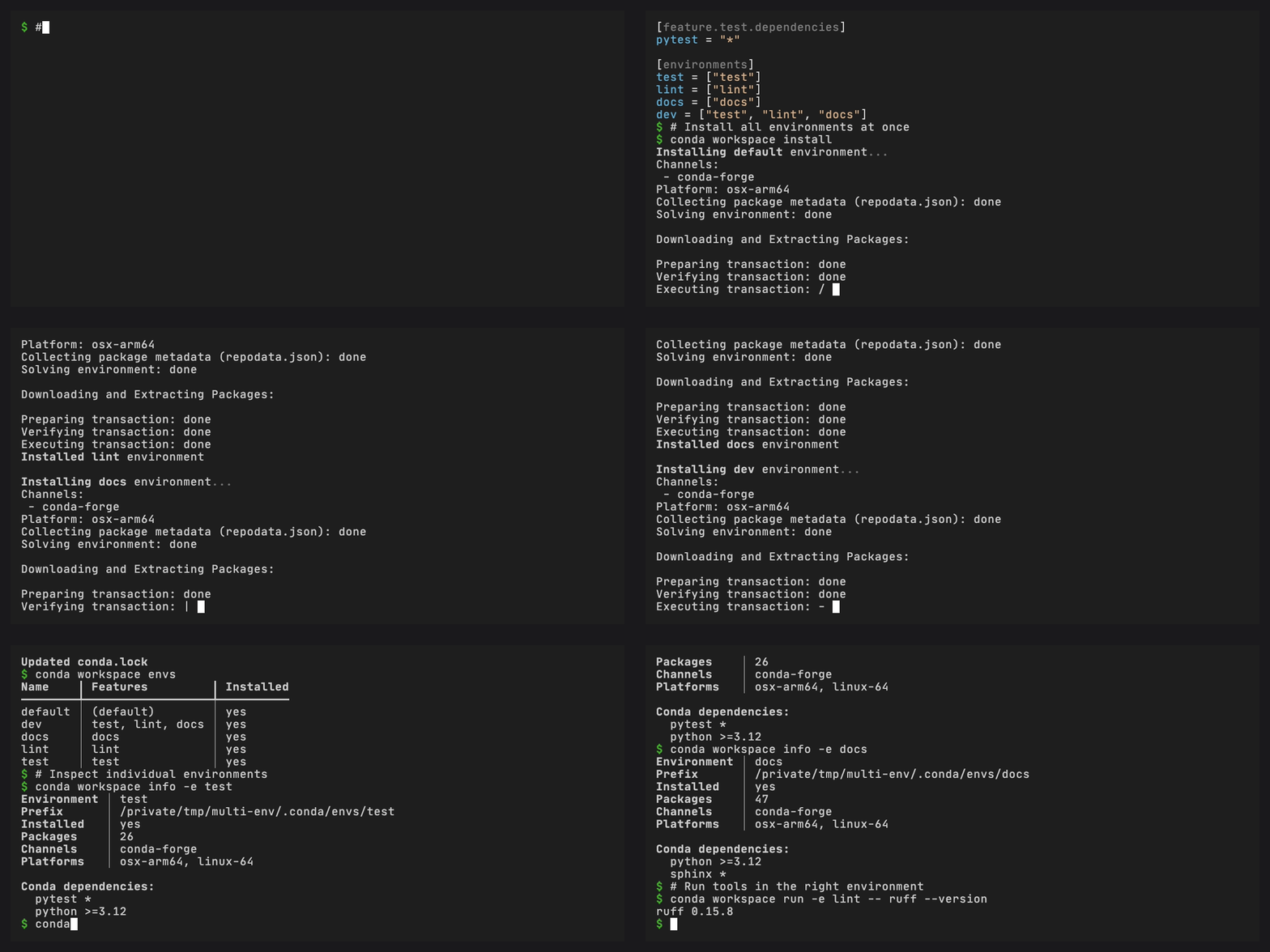
By default, each environment is installed under .conda/envs/<name>/
in the workspace root.
[environments]
default = []
docs = { features = ["docs"] }

[environments.test]
features = ["test"]

[environments.test.dependencies]
coverage = "*"

[environments.test.pypi-dependencies]
pytest-plugin = ">=1"

[environments.test.target.win-64.dependencies]
pywin32 = "*"
An implicit default environment is created when [environments] is
omitted. Every declared environment inherits the top-level default
feature unless no-default-feature = true is set. Dependencies declared
below [environments.<name>] are private to that environment and are
merged after its shared features. Environment target dependencies are
merged after its unqualified private dependencies for the selected
platform.
Note
Pixi’s solve-group key is accepted in manifests for compatibility but
has no effect. Conda’s solver operates on a single environment at a time
and does not support cross-environment version coordination. Each
environment is solved independently.
Environment lifecycle#
A managed environment has a declaration in the manifest, records in
conda.lock, and an optional installed prefix. Each command affects these
differently:
Command |
Manifest declaration |
Lock records |
Installed prefix |
|---|---|---|---|
|
Add |
Refresh |
Install |
|
Keep |
Refresh or validate |
Synchronize |
|
Keep |
Keep |
Remove |
|
Remove |
Refresh |
Remove |
Use --no-install or --no-lockfile-update with workspace add to stop
after updating the lockfile or manifest, respectively. --dry-run previews the
complete change without writing the manifest, lockfile, or prefix.
Declare an environment that composes existing features with repeatable
--with-feature options:
conda workspace add -e checks --with-feature test --with-feature docs
Each feature name must already be declared. The default feature is inherited
unless --no-default-feature is passed. An environment with that option and
no --with-feature values is a valid empty environment declaration.
Whole-environment removal requires -e NAME --all. Package specs and package
location selectors cannot be combined with --all. --yes skips the prefix
deletion prompt, but never selects whole-environment removal. Shared features
remain declared after an environment that composes them is removed.
Removal stops before changing the manifest or lockfile when the environment is
active or referenced by a task. Update every reported task reference first.
The default environment cannot be removed because it is implicit when the
manifest has no environment declarations.
List installed prefixes that no longer have a manifest declaration, then remove one by name:
conda workspace envs --orphans
conda workspace clean -e old-name
Features#
Features are composable groups of dependencies, channels, and settings.
They map to [feature.<name>] tables in the manifest:
[feature.test.dependencies]
pytest = ">=8.0"
pytest-cov = ">=4.0"

[feature.docs.dependencies]
sphinx = ">=7.0"
myst-parser = ">=3.0"
When an environment includes multiple features, dependencies are merged in order. Later features override earlier ones for the same package name.
Workspace dependency inheritance#
Use [workspace.dependencies] to centralize conda specs that multiple
dependency tables should share. A table entry opts in explicitly with
{ workspace = true }. Pixi added the same workspace dependency
inheritance syntax in 0.70.0, and conda-workspaces reads it from
conda.toml, pixi.toml, and supported pyproject.toml tables.
[workspace.dependencies]
numpy = "1.*"
cmake = { version = ">=3.28", channel = "conda-forge" }

[dependencies]
numpy = { workspace = true }

[feature.build.dependencies]
cmake = { workspace = true, build = "h*" }
The root spec supplies the version and any other base match fields. The
consuming entry may add non-version fields such as build, channel,
or subdir. Restating version alongside workspace = true is an
error.
Dependency mutation locations#
conda workspace add, conda workspace update, and
conda workspace remove change one explicit declaration location.
They do not search the composed environment for the declaration that
currently wins. The
dependency mutation rules define the
selector mapping, workspace inheritance behavior, and wrong-location
diagnostics.
# Shared feature declaration for every platform
conda workspace add --feature test pytest

# Platform override within that feature
conda workspace add --feature test --platform win-64 "pytest<9"

# Private platform override within one environment
conda workspace add --environment test --platform win-64 pywin32
workspace update uses the same selectors. A bare package name keeps
the declaration unchanged and updates only that constrained root in
installed prefixes and conda.lock.
Channels#
Channels are specified at the workspace level and can be overridden per feature:
[workspace]
channels = ["conda-forge"]

[feature.special.dependencies]
some-pkg = "*"

[feature.special]
channels = ["conda-forge", "bioconda"]
Feature channels are appended after workspace channels, with duplicates removed.
Platform targeting#
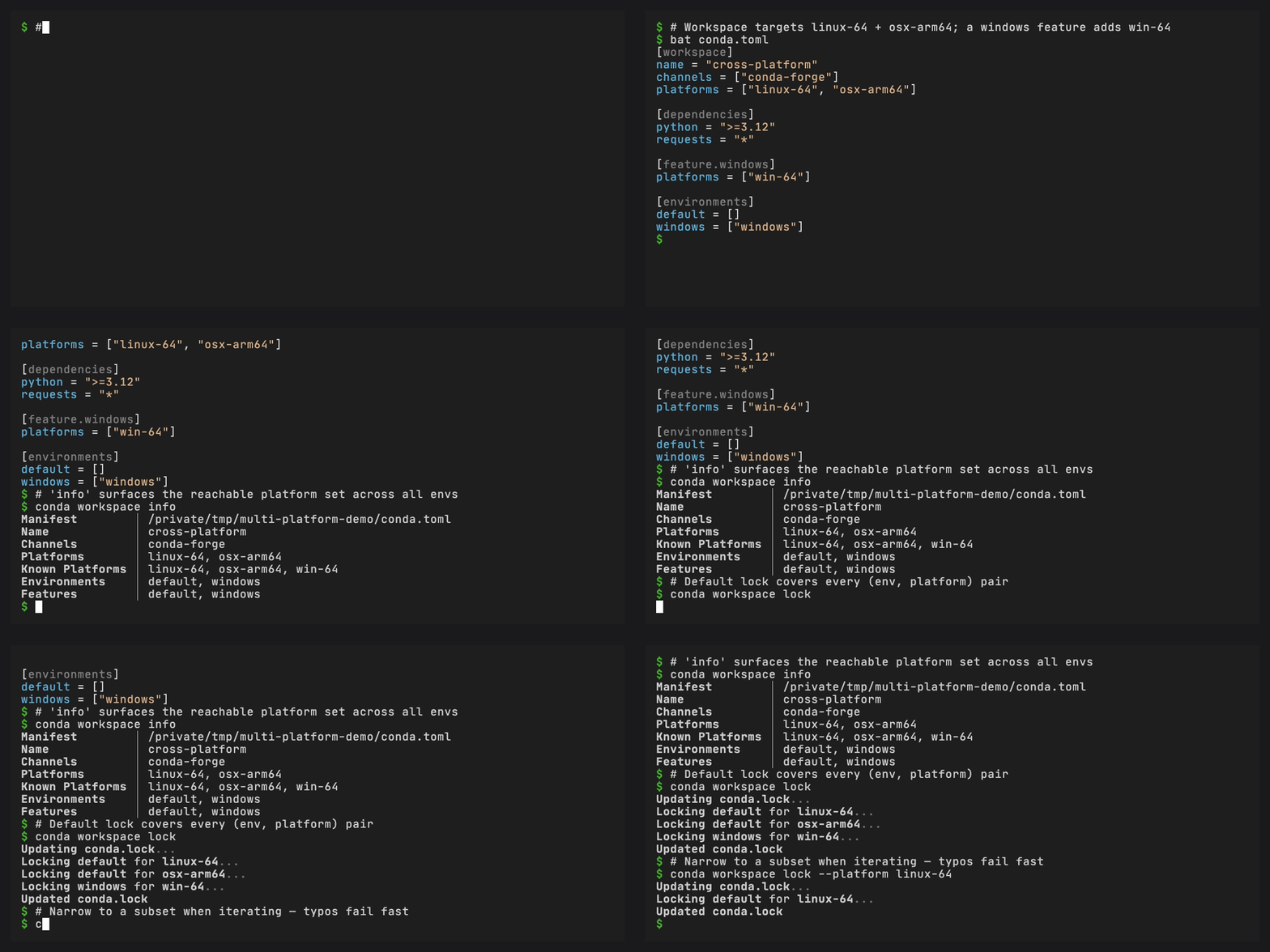
Per-platform dependency overrides use [target.<platform>] tables:
[dependencies]
python = ">=3.10"

[target.linux-64.dependencies]
linux-headers = ">=5.10"

[target.osx-arm64.dependencies]
llvm-openmp = ">=14.0"

[feature.test.target.win-64.dependencies]
pytest = "<9"

[environments.test.target.win-64.dependencies]
pywin32 = "*"
Each platform override is merged on top of the unqualified dependencies owned by the same default feature, named feature, or environment. An environment’s target dependencies are the last dependency layer for the selected platform.
Known vs. declared platforms#
Added in version 0.4.0: conda workspace info reports the reachable platform set as a
known_platforms JSON key (and a matching Known Platforms row in
the text view whenever a feature broadens the workspace-level set).
conda workspace lock --platform <subdir> --output <fragment>
validates against this same set.
The workspace-level platforms list is the default set every
environment can be solved for. Individual features may declare
additional platforms, and those are reachable through any
environment that activates that feature. To see the full reachable
set, run:
conda workspace info            # text view, extra "Known Platforms" row
conda workspace info --json     # JSON "known_platforms" key
conda workspace lock --platform <subdir> --output <fragment>
validates against this reachable set, so typos like lixux-64 are
rejected before the solver runs.
PyPI dependencies#
PyPI dependencies are specified separately from conda dependencies:
[pypi-dependencies]
my-local-pkg = { path = ".", editable = true }
some-pypi-only = ">=1.0"

[feature.test.pypi-dependencies]
pytest-benchmark = ">=4.0"
PyPI package names are translated to their conda equivalents via the
grayskull mapping and merged
into the same solver call as conda dependencies. conda-pypi delegates
to the configured solver backend to resolve conda and PyPI packages
together in a single pass and handles .whl installation.
To use PyPI dependencies you need:
conda-pypi (
>=0.9.0) for name mapping and wheel extractionconda-rattler-solver as the solver backend (no longer a hard dependency of conda-pypi, so install it explicitly)
The
conda-pypichannel (conda config --append channels conda-pypi) which serves pure Python packages from PyPI as conda packages using sharded repodata (requires the rattler solver)
Install both plugin packages into conda’s base environment so conda can discover them.
Local path dependencies (e.g. path = ".") are handled separately via
conda-pypi’s build system after the main solve completes. Git and URL
dependencies are parsed for pixi manifest compatibility but are not
installed yet. conda workspace install skips them with a warning. If
conda-pypi is not installed, version-only PyPI dependencies are skipped
with a warning, while path dependencies fail with an installation error.
See the PyPI dependencies tutorial for a full walkthrough including editable installs and troubleshooting.
No-default-feature#
An environment can opt out of inheriting the default feature:
[environments]
minimal = { features = ["minimal"], no-default-feature = true }
Use this for environments that need an independent dependency set.
Activation#
Features can specify activation scripts and environment variables:
[activation]
scripts = ["scripts/activate.sh"]
env = { MY_VAR = "value" }

[feature.dev.activation]
env = { DEBUG = "1" }
Activation settings are merged across features when composing an
environment. After conda workspace install, environment variables are
written to the prefix state file (available via conda activate) and
activation scripts are copied to $PREFIX/etc/conda/activate.d/.
Activation state and script destinations must be regular prefix-owned
paths. Replace linked conda-meta/state, etc/conda, or activate.d
entries before installing the environment.
Prefix generation checks reject links and replacements that remain visible when the prefix is modified. Conda and conda-pypi still receive filesystem paths, so these checks are not a sandbox against another process running as the same operating-system user that swaps and restores a prefix during one downstream call.
System requirements#
System requirements declare minimum system-level dependencies:
[system-requirements]
cuda = "12"
glibc = "2.17"
System requirements are added as virtual package constraints
(__cuda >=12, __glibc >=2.17) during environment solving. These
constraints limit the solver to packages compatible with the declared
system capabilities.
Channel priority#
The workspace-level channel-priority setting overrides conda’s global
channel priority during solving:
[workspace]
channels = ["conda-forge"]
channel-priority = "strict"
Valid values are strict, flexible, and disabled. When not set,
conda’s default channel priority applies.