
Export and format interoperability#
CycloneDX SBOMs#
conda workspace sbom exports one workspace environment as a CycloneDX 1.7
JSON software bill of materials. conda-workspaces selects the environment and
its requested roots. The optional
conda-sboms package maps the
packages to CycloneDX components, validates the document, and serializes it.
By default, the command reads exact package records from conda.lock and the
selected environment’s direct conda requirements from the manifest. Those
requirements become dependencies of the SBOM root component. No package
archives are downloaded or extracted. If an exact record no longer satisfies a
direct requirement, the command stops and asks you to update the lockfile.
With --from-prefix, the command describes the selected installed environment
on the host platform. Requested roots come from conda history rather than the
manifest.
Named workspace platforms can be selected by their declared name or their backing conda subdir. Use the declared name when multiple variants share one subdir.
The generic conda workspace export command can use the same CycloneDX
exporter. Use conda workspace sbom when you need workspace roots, product or
author metadata, reproducible output, or an explicit lockfile or prefix source.
See Generate a workspace SBOM for installation and command examples.
conda workspace sbom requires conda-sboms 0.3.0 or newer.
SBOM coverage limits#
Lockfile export stops before conda-sboms runs when the selected environment and platform include pip or other external package references. Prefix history can also omit detected pip packages. The resulting SBOM covers the conda package graph passed to the exporter, not every component in the workspace or prefix.
Conda package metadata does not identify every operating-system component or dependency vendored or statically linked inside a package. The generated SBOM is useful technical documentation, but it does not establish complete product coverage or Cyber Resilience Act conformity. See the conda-sboms coverage guide for details about format coverage and compliance limits.
Generic environment and manifest exports#
conda workspace export converts a workspace environment into any
format registered through conda’s conda_environment_exporters plugin
hook. The same exporters are available through conda export, so
conda-workspaces does not need separate writers for each output format.
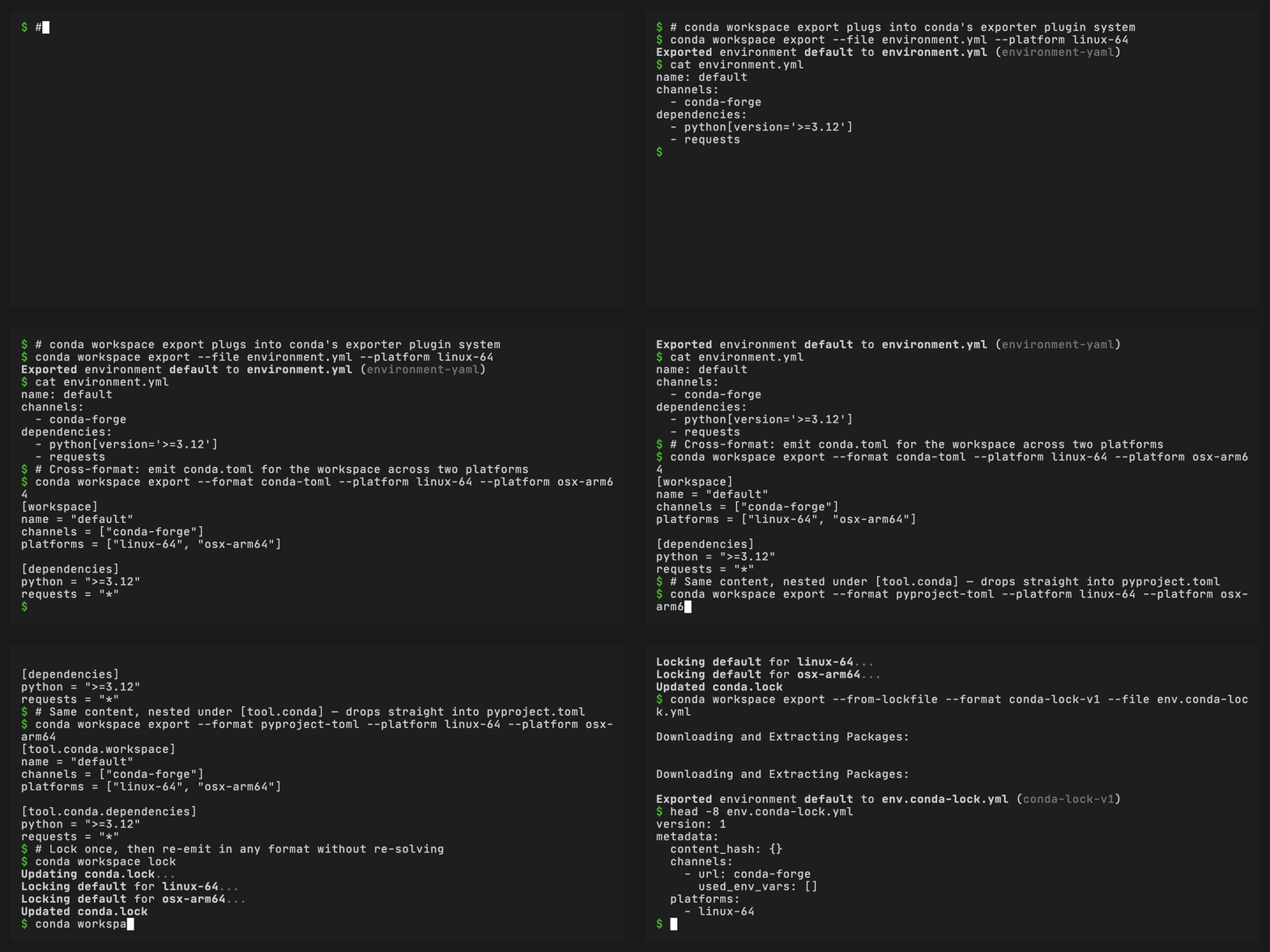
Added in version 0.4.0: conda workspace export uses conda’s
conda_environment_exporters plugin hook, so every format
available through conda export, including formats registered by a
third-party plugin such as conda-lockfiles, is also available
through conda workspace export. --from-lockfile and
--from-prefix select alternative sources. --platform
(repeatable) selects platforms for exporters that support
multiplatform_export.
Available exporters include the built-in environment-yaml /
environment-json exporters, the conda-workspaces-lock-v1 exporter
registered by conda-workspaces itself, the conda-toml / pixi-toml /
pyproject-toml manifest exporters, and any third-party exporter such
as conda-lockfiles’ rattler-lock-v6 once it is installed.
# Default: environment-yaml from the declared manifest (no install needed)
conda workspace export -e default --file exports/environment.yml

# environment.json, format auto-detected from the filename
conda workspace export -e default --file exports/environment.json

# Export the selected environment as a new conda.toml manifest
conda workspace export --format conda-toml --file exports/conda.toml

# Export the same flattened environment under [tool.conda]
conda workspace export --format pyproject-toml --file exports/pyproject.toml

# Re-emit exact package records from an existing conda.lock
conda workspace export --from-lockfile --format conda-workspaces-lock-v1 \
    --platform linux-64 --platform osx-arm64 --file exports/conda.lock

# Export environment.yml from an existing conda.lock
conda workspace export --from-lockfile --file exports/environment.yml

# Mirror ``conda export`` semantics on an installed prefix
conda workspace export --from-prefix --no-builds --from-history

# Select pixi.toml as the exact source and write somewhere else
conda workspace --file path/to/pixi.toml export \
    --file ../exports/environment.yml
The global --file before export selects the source manifest. The
subcommand’s --file selects the export destination.
Choose from three export sources:
Declared(default) resolves the declared specs from the manifest per platform. It needs no solver or installed environment, so it works before the firstconda workspace install.--from-lockfilereconstructsEnvironmentobjects from an existingconda.lockvia theCondaLockLoader.--from-prefixreads the live installed prefix the same wayconda exportdoes, so--no-builds,--ignore-channels, and--from-historybehave identically.
Use conda workspace lock when the goal is to solve the complete workspace
and update its canonical conda.lock. Export does not run the solver.
--platform (repeatable) intersects declared or available platforms
with the chosen subset. Passing multiple platforms requires an exporter
that opts into multiplatform_export. The conda-workspaces-lock-v1,
rattler-lock-v6, and the three manifest exporters (conda-toml,
pixi-toml, pyproject-toml) do. The single-platform YAML and JSON
exporters raise an error.
Manifest-format exporters#
Added in version 0.4.0: Three new exporter plugins, conda-toml, pixi-toml, and
pyproject-toml, write one selected environment in any manifest
dialect conda-workspaces already reads.
The manifest exporters flatten one selected environment. They preserve its
declared dependencies across the requested platforms, but do not preserve the
source workspace’s named features, other environments, tasks, activation
settings, or archive configuration. Write to a new file unless replacing that
structure with a single flattened environment is intentional. Specs that appear
on every requested platform go under the top-level [dependencies] /
[pypi-dependencies] tables. Platform-specific differences go under
[target.<platform>.*].
The pyproject-toml exporter wraps the same content under
[tool.conda], and when the target pyproject.toml already exists it
inserts the [tool.conda] subtree into the existing document, preserving peer
[project], [build-system], [tool.ruff], [tool.pixi], and
other tables. Any existing [tool.conda] is replaced by the
flattened selected environment.
conda.toml and pixi.toml keep the default overwrite semantics of
every other conda exporter.
Manifest exporters preserve representable conda source fields and named, credential-free PyPI direct URLs. They fail before writing when a PyPI marker, path source, VCS source, or malformed requirement cannot cross conda’s environment exporter interface without losing meaning. Keep those declarations in the source manifest, or replace them with a supported named direct URL or a target-specific dependency table.
When the export --file is passed without --format, the format is
inferred from the output basename: conda.toml maps to conda-toml,
pixi.toml maps to pixi-toml, pyproject.toml maps to
pyproject-toml, environment.yml / environment.yaml maps to
environment-yaml, environment.json maps to environment-json, and
conda.lock maps to conda-workspaces-lock-v1.
See Format aliases for the full alias table.