
Locking and reproducible installs#
conda-workspaces generates a conda.lock file in YAML format using a
rattler-lock-derived schema with a conda-workspaces-owned version byte.
The lockfile records the resolved package inventory for every
environment and platform that the workspace declares.
Changed in version 0.4.0: conda workspace lock now writes a single conda.lock that covers
every platform declared by each environment, not just the host
platform. Target-platform solves run with context._subdir
overridden so conda’s virtual package plugins (__linux, __osx,
__win) match the target platform.
Added in version 0.4.0: --platform <subdir> (repeatable) restricts the lock run to a
subset of declared platforms. Unknown platforms raise
PlatformError before any solve runs. --skip-unsolvable keeps
locking the remaining (environment, platform) pairs when an
individual solve fails, aggregating the failures into
AllTargetsUnsolvableError only if every pair fails.
SolveError now names the target platform for easier CI triage.
The conda workspace lock command runs the solver and records the
solution. It does not require environments to be installed first.
# Generate or update the lockfile for every platform declared in the manifest
conda workspace lock

# Lock only a subset of platforms into an explicit fragment
conda workspace lock --platform linux-64 --platform osx-arm64 \
  --output conda.lock.selected-platforms

# Keep solvable pairs in an explicit fragment
conda workspace lock --skip-unsolvable --output conda.lock.solvable

# Install from lockfile, validating freshness against the manifest
conda workspace install --locked

# Install from lockfile as-is without checking freshness
conda workspace install --frozen
conda workspace lock solves every environment for every platform it
declares in the manifest. Each solve runs with conda’s
context._subdir pointed at the target platform so virtual packages
(__linux, __osx, __win) match the target, not the host. Pin
tighter constraints with CONDA_OVERRIDE_* or the
[system-requirements] table when cross-compiling, for example to
fix a minimum __glibc version when solving linux-64 from macOS.
--environment, --platform, and --skip-unsolvable can produce an
incomplete result, so they require --output. An unfiltered lock is
the only workspace lock form that implicitly replaces the canonical
conda.lock. Pass --output conda.lock when replacement with a
filtered result is intentional.
Solves are fail-fast by default. The first platform that cannot be
resolved raises an error that names the environment and the platform,
and no lockfile is written. Pass --skip-unsolvable to keep locking
the remaining pairs into an explicit --output path, emitting a yellow
Skipping ... line for each one that failed. If every pair fails, the
command still raises with an aggregated summary rather than writing an
empty lockfile. Non-solver errors such as a missing channel or invalid
manifest always abort regardless of the flag.
The canonical lockfile contains all environments and their resolved packages:
version: 1
environments:
  default:
    channels:
      - url: https://conda.anaconda.org/conda-forge/
    packages:
      linux-64:
        - conda: https://conda.anaconda.org/conda-forge/linux-64/python-3.12.0-...
  test:
    channels:
      - url: https://conda.anaconda.org/conda-forge/
    packages:
      linux-64:
        - conda: https://conda.anaconda.org/conda-forge/linux-64/python-3.12.0-...
        - conda: https://conda.anaconda.org/conda-forge/linux-64/pytest-8.0.0-...
packages:
  - conda: https://conda.anaconda.org/conda-forge/linux-64/python-3.12.0-...
    sha256: abc123...
    depends:
      - libffi >=3.4
    # ...
Automatic lockfile management#
conda workspace install checks whether the lockfile satisfies the
manifest before deciding how to install. When the lockfile covers all
declared environments, channels, platforms, and dependency specs, it
installs directly from the lockfile with no solver needed. When the
lockfile is missing or out of date, it falls back to a full solve and
regenerates conda.lock.
The check compares the manifest’s dependency specs against locked package versions, so whitespace or comment changes do not trigger a re-solve.
With -e / --environment, only the selected prefix is installed or
updated. The solve path covers every declared environment and platform
when producing or previewing the canonical conda.lock. Use
conda workspace lock -e <environment> --output <fragment> when a
partial lock artifact is intentional.
Lockfile state |
Default behavior |
|
|
|
|---|---|---|---|---|
Satisfiable |
Install from lockfile |
Install from lockfile |
Install from lockfile |
Full solve |
Not satisfiable |
Full solve + update lockfile |
Error |
Install from lockfile |
Full solve |
Missing |
Full solve + create lockfile |
Error |
Error |
Full solve |
Use --no-lock to force a full solve even when the lockfile is
satisfiable, for example to pick up channel updates without editing
the manifest.
--force-reinstall controls prefix replacement independently of lockfile
selection. It recreates prefixes when using a satisfiable lockfile,
--locked, --frozen, or CI strict mode. Combine it with --no-lock when
both a fresh solve and prefix recreation are required.
Lock freshness indicator#
conda workspace info shows the lockfile status:
conda workspace info
The Lockfile row shows up-to-date (green), out-of-date (yellow),
or missing (red). The JSON output includes a lockfile_status field:
conda workspace info --json | jq .lockfile_status
CI-friendly defaults#
When the CI environment variable is set (true, 1, or yes),
conda workspace install behaves like --locked: it requires a
satisfiable lockfile and fails if it is missing or out of date. This
prevents accidental re-solves in CI that could produce different
results than local development.
# GitHub Actions example
- run: conda workspace install  # uses lockfile, fails if out of date
  env:
    CI: true  # set by GitHub Actions automatically
To override this in CI, for example in a nightly job that refreshes
the lockfile, pass --no-lock:
conda workspace install --no-lock
CI-split locking with --merge#
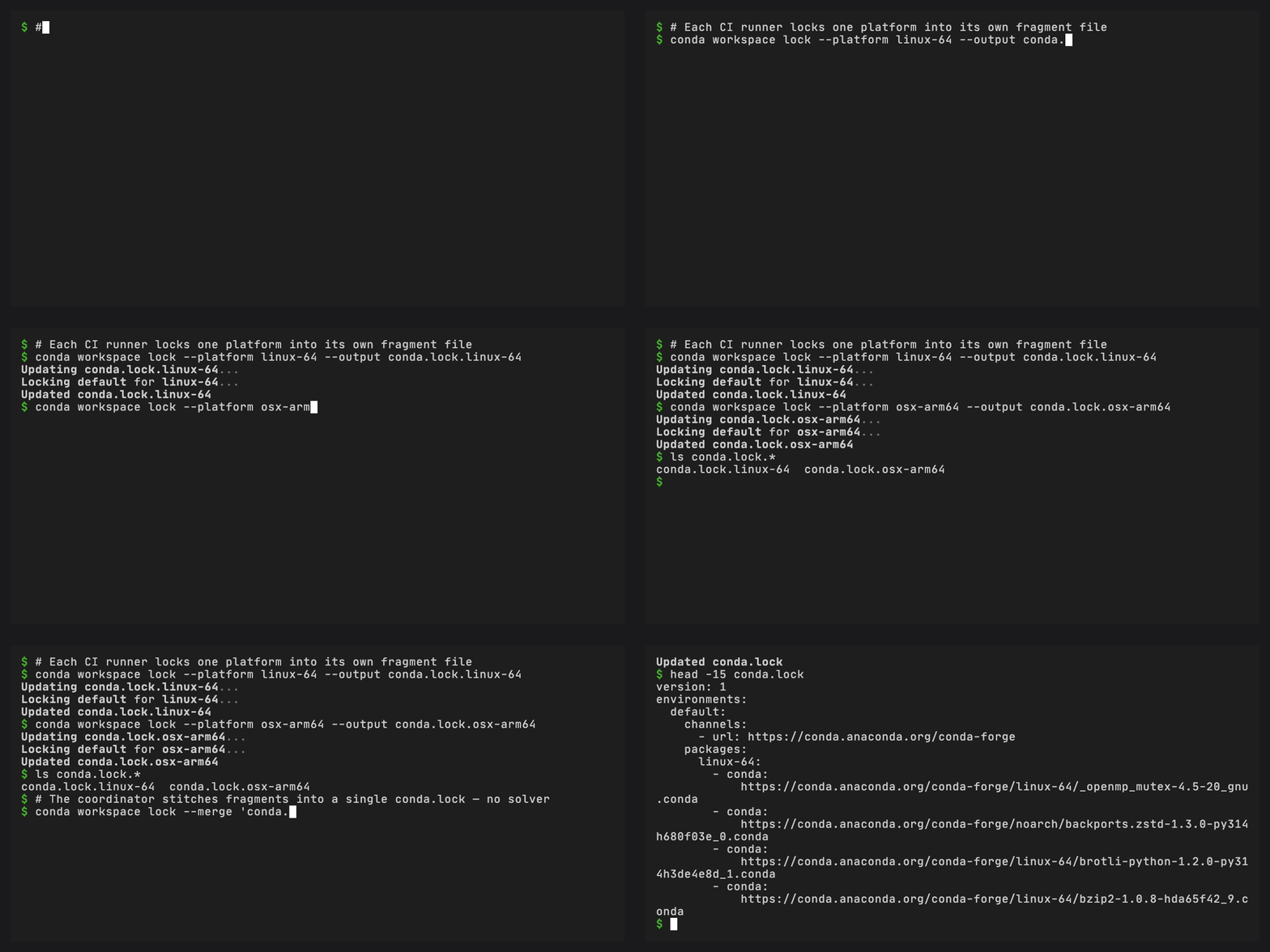
Added in version 0.4.0: conda workspace lock --output <path> writes the solved lockfile
to an arbitrary path so matrix runners can each emit one fragment.
--merge <glob> combines fragments into a single conda.lock
without running the solver. It validates schema versions and channel
lists and rejects overlapping (environment, platform) pairs.
Solving every platform in one job becomes expensive as a workspace
grows. conda workspace lock supports matrix pipelines that split
solving across runners and combine the fragments in a
coordinator job:
# In a matrix job, per platform
conda workspace lock --platform linux-64 --output conda.lock.linux-64
conda workspace lock --platform osx-arm64 --output conda.lock.osx-arm64
conda workspace lock --platform win-64 --output conda.lock.win-64

# On the coordinator: no solver runs, fragments are combined in place
conda workspace lock --merge "conda.lock.*"
--output writes the solved lockfile to the given path instead of the
default <workspace>/conda.lock. It is required with --environment,
--platform, and --skip-unsolvable, so filtered operations cannot
silently replace the complete canonical lock. Each matrix runner can
emit exactly one (env, platform) pair.
--merge loads every fragment, validates that they agree on schema
version and on each shared environment’s channel list, and rejects
overlapping (environment, platform) pairs. On success the merged
conda.lock is byte-stable with what a single-run
conda workspace lock would produce for the same inputs. --merge
is mutually exclusive with --environment, --platform,
--skip-unsolvable, and --output.
You can also select an exact manifest with the global --file / -f
option:
conda workspace --file path/to/conda.toml install
The path must name a manifest file. Omit the option to auto-detect a manifest by searching the current directory and its parents.
See Lockfile management for a guided workflow that creates, installs from, and updates a lockfile.